AP Approvals for Pegasus Opera 3

Purchase order and invoice approvals for Opera 3

AutoApprovals adds the structured sign-off process Opera 3 doesn’t have built in — approvers act from Teams or Outlook, no login required, with a full audit trail on every decision.

Purchase OrdersAuthorised before commitment
Purchase InvoicesRouted with GL context
BACS PaymentsStructured authorisation
Credit NotesSame audit trail, every time

Configured for how you workSet approval chains, value thresholds and escalation rules once — routing and chasing happens automatically.

Approve from Teams or OutlookAuthorisers review and sign off without an Opera 3 login, from any device.

Full audit trail, built inEvery approval, rejection and comment is logged — complete visibility over what was approved, by whom and when.

Why AutoApprovals

Structured sign-off, without the chasing

Faster Approvals

Automated notifications alert approvers the moment action is needed, cutting delays and bottlenecks.

Teams & Outlook Ready

Approvers review and sign off directly from Microsoft Teams or Outlook — no Opera 3 login required.

Multi-Approver Workflows

Set value thresholds, escalation rules and multiple authorisers on a single chain — configured once, then automatic.

Full Audit Trail

Every approval, rejection and comment is logged and stored — complete visibility over who approved what, and when.

What is AutoApprovals

The sign-off layer Opera 3 doesn’t have built in

AutoApprovals is a paid add-on to AutoInvoicing, purpose-built for businesses running Pegasus Opera 3. Where AutoInvoicing handles capture, matching and posting, AutoApprovals adds the structured multi-stage approval workflow on top — routing, escalation and thresholds that Opera 3’s own basic “Assigned To” field can’t provide on its own.

Approvers act from Microsoft Teams or Outlook, without ever needing an Opera 3 login, and every decision is recorded automatically. It covers purchase orders, purchase invoices, credit notes and BACS payment authorisation, so the same structured process applies wherever formal sign-off is needed.

See the full feature set on the AutoApprovals product page, or explore the wider Pegasus Opera 3 SQL SE suite.
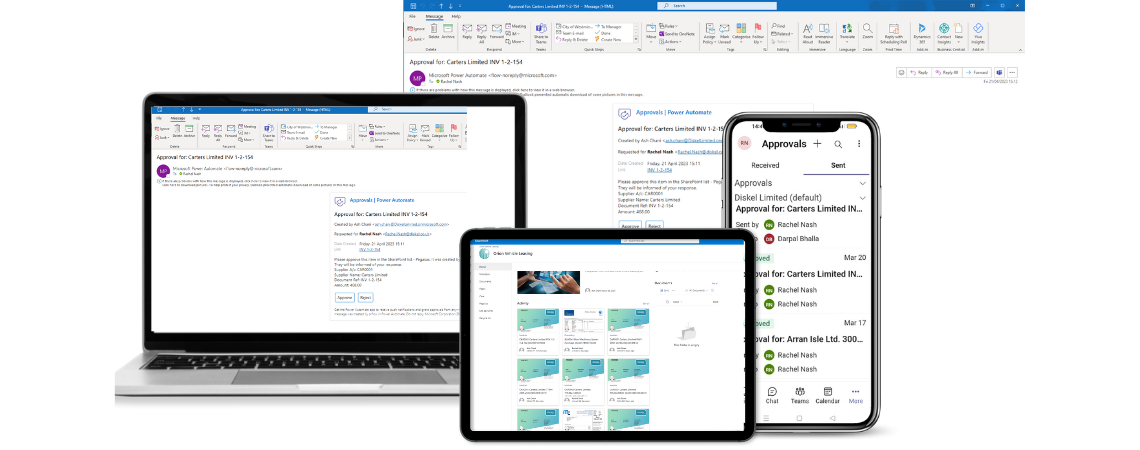
AutoApprovals approval workflow shown on mobile, laptop and Outlook
How it works

Configured for your business. Automated from there.

AutoApprovals is set up specifically for you — who approves what, up to what value, and in what order. Once configured, the process runs on its own.

1

Workflow configured to your rules

Approval chains, value thresholds and escalation rules are set up to match your existing business rules.

2

Approvers are notified

A notification lands in Teams or Outlook the moment a request needs sign-off — no chasing required.

3

Approve without logging in

Review the details and approve or reject directly, without ever needing to open Opera 3. Authorisers don’t need an Opera 3 licence.

4

Everything is recorded

Approved purchase orders progress automatically. Every action is logged and stored in SharePoint as standard.

Microsoft Teams Outlook SharePoint Opera 3 & Opera 3 SE
Key features

Everything AutoApprovals does for your Opera 3 team

AutoApprovals adds the structured sign-off processes that Opera 3 doesn’t have built in — from configuring your approval chains to notifying approvers and capturing a full audit trail automatically.

Approval workflows

  • Configure workflows to match your existing business rules
  • Set value thresholds and spending limits per approver
  • Multi-approver chains and escalation rules
  • Supports purchase invoice and purchase order approval
  • Automatic routing — no manual chasing required
  • Works with all versions of Opera 3, SQL and SE

Microsoft 365 integration

  • Approvers notified automatically via Microsoft Teams or Outlook
  • Approve or reject directly from Teams or email — no Opera 3 login needed
  • Approval documents stored securely in SharePoint
  • Live approval status visible at a glance in SharePoint
  • Approve from anywhere — office, home or mobile
  • Works alongside AutoFiling for end-to-end document management

Audit trail & control

  • Full audit trail on every approval decision — who, what and when
  • Eliminates unauthorised spending and rogue purchases
  • Complete visibility of where every request stands
  • Replaces scattered email chains and paper sign-off sheets
  • Developed by Diskel — Pegasus Authorised Developers
  • Minimal training required — simple, intuitive interface
Supported approval types

AutoApprovals can be configured to handle sign-off workflows across the following areas.

Purchase invoices Purchase orders Credit notes Expense claims Multi-approver chains Value-based thresholds Escalation rules
The AutoSuite

Part of a complete Opera 3 automation suite

AutoApprovals* works alongside the rest of the AutoSuite to cover invoice capture, approval and document storage in one connected process.

AutoInvoicing

OCR capture, PO and GRN matching, and automated posting straight into Opera 3’s Purchase Ledger. AutoApprovals is a paid add-on to AutoInvoicing.

See AutoInvoicing →

AutoFiling

Secure document storage and retrieval for Opera 3 documents and all other business documents — fully GDPR compliant.

See AutoFiling →

*AutoApprovals is a separate paid add-on to AutoInvoicing, not a standalone product. It requires an existing AutoInvoicing installation.

Ready when you are

See AutoApprovals working with your own Opera 3 setup

Book a free demo and we’ll walk through how approval workflows, thresholds and escalation rules would look for your team.